Eurekiel is a custom 3D game engine written in C++17, targeting DirectX 12 with a focus on voxel worlds and deferred rendering. The engine uses a modular subsystem architecture: major systems (graphics, resources, audio, input) register as independent subsystems managed by an Engine singleton, keeping modules loosely coupled.
The rendering backend features SM6.6 bindless resource indexing, a deferred shading pipeline compatible with the Iris shader specification, and a Shader Bundle system with multi-layer fallback chains. The voxel module provides chunk management, biome generation, fluid simulation, and block lighting.
Engine architecture
Eurekiel follows a subsystem-based architecture. The Engine class acts as a central registry: game applications instantiate and register subsystems during startup, and the engine manages their lifecycle (startup, per-frame update, shutdown) in registration order.
// Subsystem registration during application startup
GEngine->RegisterSubsystem(std::make_unique<LoggerSubsystem>());
GEngine->RegisterSubsystem(std::make_unique<EventSubsystem>(eventConfig));
GEngine->RegisterSubsystem(std::make_unique<ResourceSubsystem>(resourceConfig));
GEngine->RegisterSubsystem(std::make_unique<RendererSubsystem>(renderConfig));
GEngine->RegisterSubsystem(std::make_unique<ShaderBundleSubsystem>(bundleConfig));
GEngine->RegisterSubsystem(std::make_unique<ImGuiSubsystem>(imguiConfig));

GEngine->Startup(); // initializes all subsystems in registration order
The main loop runs through a BeginFrame -> Update -> Render -> EndFrame cycle. Subsystems hook into the phases they need, while the application layer drives scene logic and render pass execution through public engine APIs.
Engine modules
Core
The foundation layer hosts the Engine singleton, the EngineSubsystem base class, the system Clock, error handlers, and configuration parsers:
- Logger: Category-based structured logging with severity filtering
- Console: Developer console with command parsing and history
- Event: Publish-subscribe event bus for inter-system messaging
- Schedule: YAML-configured task scheduling
- ImGui: Dear ImGui integration for debug overlays and editor tooling
- Command: Command registration and invocation framework
Graphics (DirectX 12)
The DirectX 12 rendering backend is organized into several modules:
- DX12 Core: Wraps device creation, command queues, swap chain, and resource transitions in
D3D12RenderSystem - Resource management: Typed GPU resources (
D12Buffer,D12Texture,D12RenderTarget,D12DepthTexture) inheriting from a sharedD12Resourcebase - Bindless resources: SM6.6 bindless architecture with a global descriptor heap, index allocator, and a 128-byte root signature
- Camera system: Strategy-pattern cameras (
PerspectiveCamera,OrthographicCamera,ShadowCamera,UICamera) implementingICamera - Shader bundles: Shader packaging and fallback system compatible with Iris shader packs, supporting a three-tier fallback chain (Current, Program, Engine Default)
- Render targets: Centralized management for up to 16 color textures and depth buffers (
colortex0-15,depthtex0-2) - Shadow system: Shadow map generation and sampling
- Command lists:
CommandListManagerfor recording and submitting across multi-queue graphics pipelines
The deferred pipeline supports a 24-phase rendering schedule compatible with Iris’s WorldRenderingPhase, spanning geometry passes (terrain, cutout, translucent, sky), shadow generation, deferred lighting, composite passes, and final presentation.
Math
A self-contained vector and geometry math library:
- Vectors (Vec2/3/4, IntVec2/3/4), 4x4 matrices, Euler angles, and rotation utilities
- Geometric primitives: AABB, OBB, spheres, planes, capsules, cylinders, and convex hulls
- Curves: Cubic Bezier, Hermite splines, and easing functions
- Procedural noise: Raw and smooth noise generators
- Raycasting and intersection tests
Resource
A namespaced resource manager supporting multiple asset roots:
- Resource discovery and directory indexing
- Typed loaders for textures, meshes, audio, and block definitions
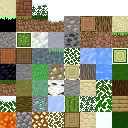
- Texture atlas packing and UV management
- Asset metadata tracking and hot reloading during development
Voxel
A voxel engine implementation featuring:
- Block system: Block states, properties, placement context, and voxel collision shapes
- Chunk system: Chunk data arrays, chunk management, and multithreaded mesh construction (
BuildMeshJob) - World generation: Multi-noise biome systems, procedural terrain, and feature decorators
- Fluid simulation: Block-level fluid spreading and leveling
- Lighting: Block and sky light propagation algorithms
- In-game time: Day and night cycle clocks
Window
Win32 window creation, event dispatch, and input routing configured via WindowConfig.
Renderer (legacy)
An immediate-mode DirectX 11 rendering layer providing IRenderer, bitmap font rendering, sprite drawing, and debug primitives. It remains available for 2D UI and debug visualization while the DX12 Graphics backend handles modern passes.
Application integration
To build a project with Eurekiel, the game application defines an App class that owns the engine lifecycle and a Game class for scene logic. The application controls the entry point, treating the engine as a linked library.
Entry point
The Win32 entry point creates the App, runs the message loop, and handles shutdown:
int WINAPI WinMain(HINSTANCE, HINSTANCE, LPSTR, int)
{
    g_theApp = new App();
    g_theApp->Startup();

    while (!g_theApp->IsQuitting())
    {
        RunMessagePump();   // process OS messages (input, focus, resize, etc.)
        g_theApp->RunFrame();
    }

    g_theApp->Shutdown();
    delete g_theApp;
    return 0;
}
Startup and subsystem registration
In App::Startup(), the application creates an Engine instance and registers subsystems in order of dependency. The engine assumes ownership through std::unique_ptr:
void App::Startup()
{
    Engine::CreateInstance();

    // Register subsystems in dependency order
    GEngine->RegisterSubsystem(std::make_unique<LoggerSubsystem>());
    GEngine->RegisterSubsystem(std::make_unique<EventSubsystem>(eventConfig));
    GEngine->RegisterSubsystem(std::make_unique<ResourceSubsystem>(resourceConfig));

    // Window and input are created before the renderer (it needs a target window)
    g_theWindow = new Window(windowConfig);
    g_theWindow->Startup();

    // Renderer subsystem configured via YAML with programmatic overrides
    auto renderConfig    = RendererSubsystemConfig::ParseFromYaml(".enigma/config/engine/renderer.yml")
                               .value_or(RendererSubsystemConfig::GetDefault());
    renderConfig.targetWindow = g_theWindow;
    GEngine->RegisterSubsystem(std::make_unique<RendererSubsystem>(renderConfig));

    // Shader bundle, ImGui, etc.
    GEngine->RegisterSubsystem(std::make_unique<ShaderBundleSubsystem>(bundleConfig));
    GEngine->RegisterSubsystem(std::make_unique<ImGuiSubsystem>(imguiConfig));

    GEngine->Startup();  // initializes all registered subsystems

    // Create the game object: your scene logic lives here
    m_game = std::make_unique<Game>();
}
Subsystems can be queried anywhere by type:
auto* renderer = GEngine->GetSubsystem<RendererSubsystem>();Frame loop
RunFrame() runs a four-phase cycle where engine subsystems handle setup and cleanup, leaving gameplay to update and render:
void App::RunFrame()
{
    BeginFrame();  // tick the clock, call GEngine->BeginFrame() + input begin
    Update();      // GEngine->Update(dt), then game logic
    Render();      // game draws the scene via render passes
    EndFrame();    // input end, GEngine->EndFrame() (present, flip, cleanup)
}
The engine manages swap chains, descriptor allocations, and barriers internally, allowing game code to work through render passes.
Shutdown
Shutdown cleans up in reverse registration order:
void App::Shutdown()
{
    m_game.reset();          // destroy game first
    GEngine->Shutdown();     // shuts down all subsystems in reverse order
    g_theWindow->Shutdown();
    delete g_theWindow;
    Engine::DestroyInstance();
}
Build system and integration
The engine and game live in separate Visual Studio projects. Engine.vcxproj compiles as a static library (.lib) referenced by the game project via <ProjectReference>.
Include paths
The game project configures two include roots:
$(SolutionDir)Code/           (game source, e.g. #include "Game/Framework/App.hpp")
$(SolutionDir)../Engine/Code/ (engine source, e.g. #include "Engine/Core/Engine.hpp")
Prefixing headers with Engine/ keeps boundaries clear across modules.
Library linking
The linker includes:
Temporary/Engine_x64_Debug/(or Release) for the engine static libraryEngine/Code/ThirdParty/DXC/lib/x64for the DirectX Shader Compiler import libraryRun/for runtime DLLs
The explicit link dependency is dxcompiler.lib, with remaining Windows APIs resolved through the engine static library and SDK defaults.
Post-build asset syncing
After compilation, a post-build command copies the game binary to Run/ and executes CopyEngineResources.bat to sync default shaders, fonts, and YAML templates from .enigma/ into the working directory.
Third-party dependencies
Third-party dependencies reside in Engine/Code/ThirdParty/ and compile directly into the engine static library:
| Library | Purpose |
|---|---|
| d3dx12 | Direct3D 12 helper headers for barriers, descriptors, and resource descriptions |
| DXC | DirectX Shader Compiler for runtime HLSL compilation targeting Shader Model 6.x |
| imgui | Immediate-mode debug UI with DX11, DX12, and Win32 backends |
| json | nlohmann/json single-header parser for configurations |
| TinyXML2 | Lightweight XML parser for legacy configs |
| stb | Single-header image loaders |
| tinygltf | glTF 2.0 asset loader |
| yaml-cpp | YAML parser for engine and shader bundle configs |
| fmod | Audio middleware linked dynamically via fmod64.dll |
| googletest | Unit testing framework |